Choosing the right way to install a mobile game can make a difference to your device’s security, installation process, and future updates. Free Fire APK vs Google Play 2026 is an important comparison for Android users who want to understand the differences between downloading an APK file manually and installing the game through the Google Play Store.
Both methods may allow users to install an Android application, but they differ in how files are obtained, how installation works, and how updates and security checks are handled. Before choosing either option, it is important to consider compatibility, download sources, device safety, and convenience.
This guide explains the key differences between APK installation and Google Play, helping you make a more informed decision.
Free Fire APK vs Google Play 2026: What Is the Difference?
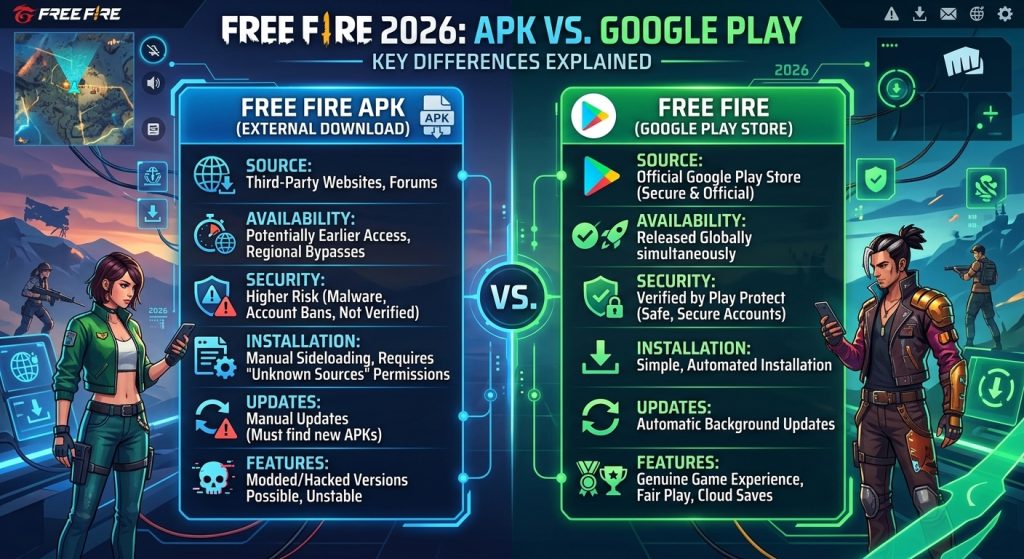
The main difference is how the game installation package reaches your device.
When you use Google Play, you install the application through Google’s app distribution platform. The store provides app information and compatibility details, and supported installations can receive updates through the platform.
An APK is an Android application package. When you download an APK manually, you obtain an installation file from a website or another source and install it using your device’s Android installation process.
The experience depends on the file, its source, the Android version, and the distribution method. Not every APK available online is official or safe.
1. Installation Process
Installing Free Fire Through Google Play
Google Play provides a straightforward installation process:
- Open the Google Play Store.
- Search for Free Fire.
- Check the app name and publisher.
- Review the available compatibility and download information.
- Tap Install if the application is available for your device.
The store manages the supported download and installation process, so users generally do not need to locate or open an APK file manually.
Installing Free Fire Through an APK
Manual APK installation requires additional steps:
- Find a trustworthy source for the installation file.
- Download the APK compatible with your device.
- Open the downloaded file.
- Review any Android permission or security prompts.
- Continue only if you trust the source and the file is legitimate.
Depending on your Android version, you may need to allow installation from the specific browser or file manager. Avoid enabling this permission for untrusted sources.
2. Security and Safety
Security is one of the most important considerations when comparing the two methods.
Google Play Security
Google Play offers app distribution features and security checks, including Google Play Protect scanning. These protections help identify potentially harmful applications, although no security system can guarantee that every application is risk-free.
APK Security
APK safety depends heavily on where the file comes from and whether it has been modified. An unknown website may distribute outdated, altered, or malicious files that imitate the original game.
Before installing an APK, check the source, verify the application identity, and take security warnings seriously.
For additional information, read the official Google Play Protect guide.
3. Updates and New Versions
Game updates can include bug fixes, new features, performance improvements, and security-related changes.
With Google Play, supported updates can generally be managed through the store. You can check whether an update is available and install it using the normal update process.
With manual APK installation, you may need to locate a compatible newer file and install it yourself. An APK from an unreliable source might be outdated or incompatible with the current version.
For most users, the official store is a convenient way to manage updates when the game is available there.
4. File Size and Storage Requirements
The APK download size and the total installed game size are not necessarily identical.
An APK may contain some installation files, while the game may require additional resources after installation. Updates, temporary files, and downloaded game content can also affect total storage usage.
The Google Play download size may vary depending on the device and the files required. Similarly, the size of a manually downloaded APK can differ according to its version and package type.
Before installing either version:
- Check the available storage on your phone.
- Review the download information from a trusted source.
- Leave room for installation and additional resources.
- Avoid incomplete or damaged downloads.
You can also read our Free Fire APK File Size 2026 guide for more information about storage requirements.
5. Compatibility With Your Android Device
Not every application version works on every Android device. Compatibility can depend on the Android version, device hardware, application requirements, and regional availability.
Google Play normally displays whether an application is available for your device. If it is not compatible, the store may prevent installation.
With manual APK installation, you must ensure that the package is appropriate for your device. Installing an incompatible APK may result in a parsing error, installation failure, or problems launching the application.
Avoid trying random APK versions to bypass compatibility restrictions. Instead, check the game’s current requirements and use a supported installation method.
6. Regional Availability
Application availability can vary by country or region because of publisher decisions, distribution policies, or other restrictions.
If Free Fire is not listed in your local Google Play Store, first check the publisher’s official information to determine whether the application is available in your region.
Do not assume that every website offering an APK is authorized to distribute the game. Be cautious of sites that ask for unnecessary personal information or promise special versions with unrealistic features.
7. Which Method Is Easier for Beginners?
For most beginners, Google Play is the simpler option when the official game is available and compatible with their device.
The store provides a familiar installation interface and makes it easier to manage supported updates. Users also avoid the extra steps involved in finding and manually installing an APK.
Manual APK installation may be useful in specific legitimate situations, but it requires more attention to the source, file compatibility, and Android security prompts.
If you are unfamiliar with APK files, using the official store is generally the more straightforward choice.
Advantages and Disadvantages of Each Method
| Feature | Google Play | Manual APK |
|---|---|---|
| Installation | Simple store-based process | Requires downloading and opening a file |
| Updates | Convenient through supported store updates | May require manual updates |
| Security | Built-in platform checks | Depends heavily on the source and file |
| Compatibility | Store checks device availability | User must check package compatibility |
| Storage | Depends on the version and downloaded resources | Depends on the APK and additional resources |
| Ease of use | Generally easier for beginners | Requires more care and technical awareness |
Neither method should be considered automatically safe in every circumstance. The source and integrity of the application remain important.
How to Avoid Fake Free Fire APK Files
Fake APK files can expose your device to security and privacy risks. Take the following precautions before downloading any installation package:
- Prefer official distribution channels whenever available.
- Check the application name and publisher.
- Avoid modified APKs promising unauthorized advantages.
- Do not install files that trigger serious security warnings.
- Never provide account passwords or verification codes to download websites.
- Keep Android security protections enabled.
- Delete suspicious files rather than attempting to bypass warnings.
If an APK asks for permissions that do not make sense for a game, stop and investigate before proceeding.
Free Fire APK vs Google Play 2026: Which Should You Choose?
For most Android users, Google Play is the recommended option when the official game is available and compatible. It provides a familiar installation experience and convenient management of supported updates.
Manual APK installation requires additional care. It may be appropriate in certain legitimate circumstances, but users must verify the source, check compatibility, and understand the security implications.
Whichever method you choose, avoid modified or suspicious files and keep your device’s security protections enabled.
Final Thoughts
The Free Fire APK vs Google Play 2026 comparison comes down to convenience, compatibility, updates, and security. Google Play generally offers a simpler experience for installing and updating the game, while manual APK installation requires users to take more responsibility for verifying the downloaded file.
Before installing Free Fire, check its availability for your region and device, review storage requirements, and use a trustworthy source. Making a careful choice can help reduce installation errors and protect your Android device.