Free Fire APK FAQ 2026 answers common questions about downloading, installing, updating, and troubleshooting Garena Free Fire on Android devices. Whether you are installing the game for the first time or fixing an update problem, understanding the correct installation process can help you avoid errors and protect your gaming account.
Free Fire is a mobile battle royale game developed by Garena. Players compete in survival matches, unlock in-game items, and participate in different game modes. To enjoy the latest features, it is important to use a compatible device and install updates from trusted sources.
In this guide, you will find practical answers about APK installation, device compatibility, updates, login problems, security, and frequently asked questions.
What Is Free Fire APK?
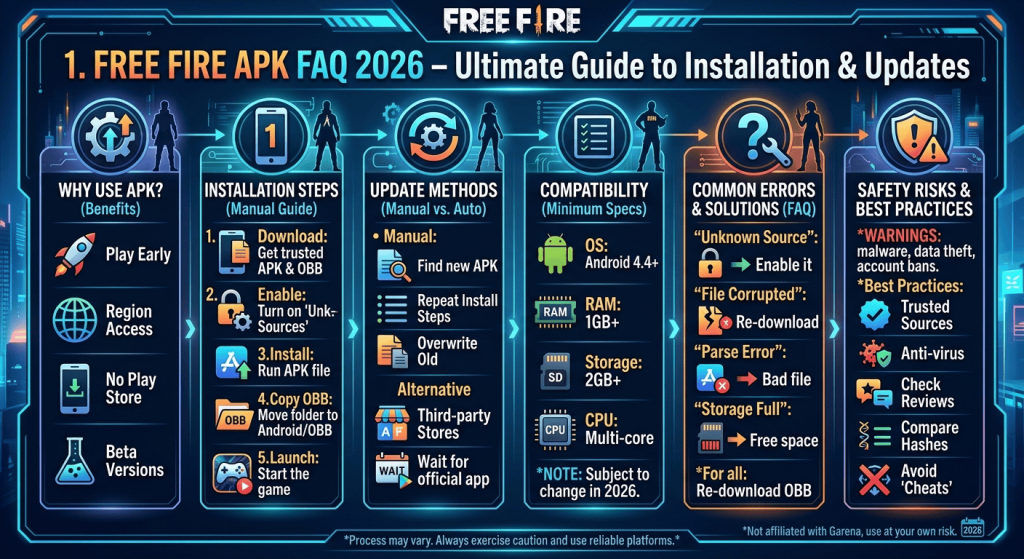
An APK is an Android application package used to install apps on compatible Android devices. The Free Fire APK is the installation package for the Android version of the game.
For most players, installing Free Fire through Google Play is the simplest option. Garena also provides an official download route for devices that cannot access the usual app stores. Check the official Free Fire FAQ for supported download options.
How to Download Free Fire APK in 2026
Follow these steps to install the game safely:
- Check that your Android device has enough free storage and a stable internet connection.
- Visit the official Free Fire website.
- If Google Play is available, open the game’s official listing and tap Install.
- If your device cannot access the app store, check Garena’s official instructions for downloading the APK directly.
- If installing an APK, follow the Android security prompts only after confirming that the file comes from an official source.
- Open the game after installation and allow any required in-game resources to download.
- Log in using your supported account method.
Avoid modified APKs, unofficial installers, and files claiming to unlock paid items. They can expose your device or account to unnecessary risks.
How to Update Free Fire APK
Keeping Free Fire updated can help you access new features and resolve compatibility problems.
- Google Play users: Open Google Play, search for Free Fire, and tap Update if the option appears.
- Official APK users: Check Garena’s official download page for the latest supported installation package and instructions.
- After updating: Open the game and allow additional resources to finish downloading before joining a match.
Update availability can vary by region and rollout schedule. If an update is not showing, check the official announcements before downloading another installer.
Free Fire APK FAQ 2026: Common Questions
Is Free Fire APK free to download?
Free Fire is free to download and play, although the game offers optional in-game purchases. Review purchase details carefully before spending money.
Is Free Fire APK safe?
The safest approach is to download Free Fire through Google Play or Garena’s official website. Unofficial APK files may contain harmful software or modified game components. Garena warns players against unauthorized software and modified clients in its Game Security FAQ.
Why is Free Fire APK not installing?
Common causes include insufficient storage, an incompatible Android version, a corrupted installation file, or a conflict with an existing installation. Free up storage, download the installer again from an official source, and check your device’s compatibility.
Why does Free Fire require an update?
The game may require an update to access the current version or connect properly to its servers. Use the official app store or Garena’s official download instructions rather than an unknown third-party website.
Can I install Free Fire without Google Play?
Garena provides an official APK download route for certain devices that do not support Google Play or the App Store. Follow the instructions on the official Free Fire website and avoid unofficial download mirrors.
What should I do if Free Fire crashes?
Restart your device, close unnecessary background apps, check your internet connection, and make sure the game is updated. If the problem continues, check available storage and contact Garena support.
Will I lose my account after updating?
A normal update should not require you to create a new account. However, you should remember which supported login method is linked to your account. Never share your password or verification codes with unofficial services.
Is Free Fire MAX the same as Free Fire?
Free Fire MAX is a separate version designed to offer enhanced visual presentation. Check the official game’s information to understand the differences and confirm which version your device supports.
Tips for a Better Free Fire Experience
Use a stable internet connection, keep your device’s operating system updated, and close unnecessary apps before playing. If performance becomes slow, reduce graphics settings where available and ensure your device is not overheating.
Never use modified game clients, cheats, or unauthorized tools that promise unlimited diamonds or special advantages. Such tools can compromise your account and violate game rules.
For more gaming guides and related information, visit FF APKs. For downloads, security announcements, and game-specific support, always prioritize Garena’s official resources.
Conclusion
The Free Fire APK FAQ 2026 guide covers the essentials of installing, updating, and troubleshooting the game on Android devices. Use trusted download sources, verify compatibility, and keep your game updated to reduce common installation problems.
If an error continues after basic troubleshooting, consult Garena’s official support resources rather than installing modified APK files. A secure installation helps protect both your device and your gaming account.