
Free Fire Account Safety 2026 is important for every player who wants to protect their progress, purchased items, diamonds, and account access. Losing an account can be frustrating, especially if you have spent time improving your rank or unlocking exclusive rewards. Fortunately, following a few practical security steps can help reduce the risk of hacking, phishing, and unauthorized access.
Garena recommends binding guest accounts, protecting linked login accounts, enabling two-step verification where available, and using official game clients. This guide explains how to protect your Free Fire account, recognize common scams, and respond if you notice suspicious activity.
Why Is Free Fire Account Safety 2026 Important?
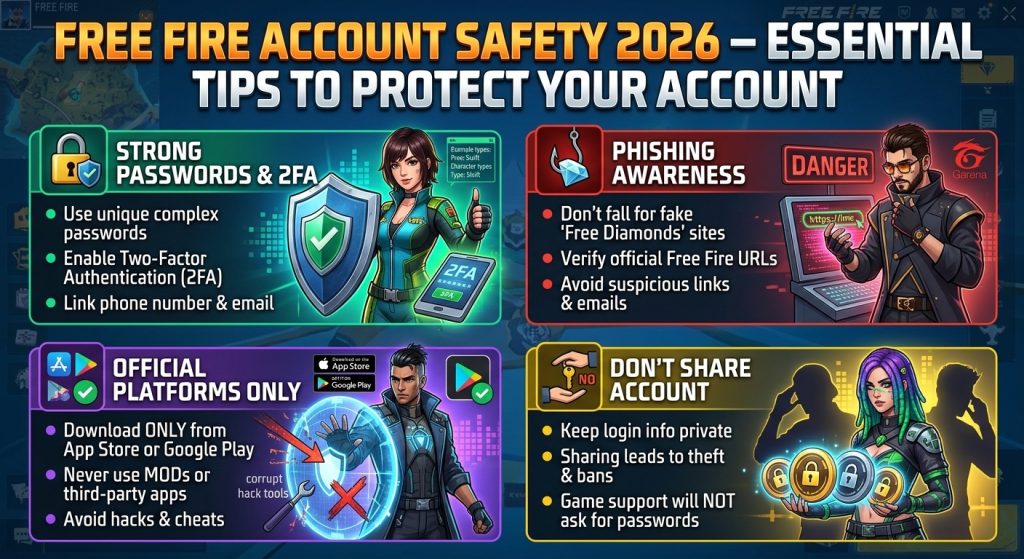
Your Free Fire account may be connected to a third-party platform, such as Google or Facebook, depending on the login method available to you. If someone gains access to that linked account, they may also be able to access your game account.
Common risks include:
- Fake diamond generators and reward websites.
- Phishing links shared through messages or social media.
- Weak or reused passwords.
- Sharing account credentials with friends or strangers.
- Downloading modified APKs or unauthorized game clients.
- Leaving your account signed in on another person’s device.
Following official security recommendations can help you avoid many of these risks. Read Garena’s official account protection guide for additional instructions.
7 Essential Free Fire Account Safety 2026 Tips
1. Bind Your Guest Account
If you play Free Fire using a guest account, binding it to a supported third-party platform account should be one of your first security steps.
Garena warns that guest-account data may be lost after certain updates and may not transfer between different devices or between Free Fire and Free Fire MAX.
To protect your progress:
- Open Free Fire on your device.
- Go to the account settings.
- Look for the available account-binding options.
- Select a supported platform that you control.
- Follow the on-screen instructions to complete the process.
- Confirm that the account is linked successfully.
Use an account that belongs to you and that you can recover if you forget its password.
2. Use a Strong and Unique Password
Your linked platform account is an important part of your Free Fire security. A weak password can put your game account at risk.
Follow these practices:
- Use a long password that is difficult to guess.
- Avoid using your name, birthday, or simple number sequences.
- Do not reuse the same password across several websites.
- Never share your password with friends or other players.
- Change it immediately if you suspect someone has accessed your account.
A password manager can help you create and store strong passwords securely.
3. Enable Two-Step Verification
Enable two-step verification on the platform connected to your Free Fire account whenever that feature is available.
Two-step verification adds another security check when someone attempts to sign in. This can make unauthorized access more difficult, even if your password is exposed.
Open the security settings of your linked Google, Facebook, or other supported account and follow its official instructions.
Never share verification codes with anyone. A person claiming to be a tournament organizer, diamond seller, or support agent should not need your login code.
4. Add a Recovery Email if Available
Garena provides a recovery-email feature for eligible Free Fire accounts. According to its official guidance, the feature can help players recover access if they lose access to their linked platform account.
To set it up:
- Open Free Fire and sign in to your account.
- Open Settings and locate the account-binding section.
- Check whether recovery-email binding is available.
- Use a secure email address that you control.
- Follow the verification instructions.
- Set up the required security code and store it safely.
Eligibility requirements may apply, and the feature may not be available for every account. Follow Garena’s recovery-email instructions for the latest process.
5. Avoid Fake Free Diamond Websites
Fake diamond offers are a common security risk. A website may promise unlimited diamonds, free skins, rare bundles, or exclusive rewards in exchange for your login details.
Be cautious if a website:
- Requests your password or OTP.
- Promises unlimited diamonds through a generator.
- Requires an unknown APK or application.
- Asks you to complete suspicious surveys before receiving rewards.
- Pressures you to act immediately.
- Claims to provide guaranteed account upgrades outside official channels.
Never enter your login details on an unverified reward website. Check promotions through the official Free Fire website and trusted Garena announcements.
6. Download Free Fire from Official Sources
Using unofficial or modified game clients can expose your device and account to security risks. Garena also warns that unauthorized APKs and third-party software can violate its rules and lead to account penalties.
For safer downloads:
- Use the official Google Play Store or another authorized app store available in your region.
- Verify the publisher before installing the game.
- Avoid modified APKs, cheats, scripts, and suspicious add-ons.
- Do not disable device security protections to install an unknown file.
- Keep the game and your device software updated.
If you use Free Fire MAX, download it only through an official distribution channel supported in your region.
7. Check Login History and Sign Out of Unknown Devices
Monitoring your account’s login activity can help you detect suspicious access.
If Free Fire provides a Login History option for your account, review it regularly. If you see an unfamiliar device or activity you cannot explain, take action immediately.
- Change the password of the linked platform account.
- Sign out unknown sessions from that platform’s security settings.
- Open Free Fire and review its login-management options.
- Use the in-game option to log out of all devices if available.
- Secure your recovery email and monitor the account for further changes.
Garena provides more detailed instructions in its device-login management guide.
How to Recognize a Free Fire Account Scam
Scammers often try to create excitement or urgency so that players act before checking the offer. Learning to recognize warning signs can help protect your account.
| Scam type | Warning sign | Safer action |
|---|---|---|
| Free diamond generator | Requests your game login | Do not enter your credentials |
| Fake giveaway | Demands an OTP or password | Verify the offer through official channels |
| Cheap diamond seller | Requests account access | Use official purchase methods |
| Fake support message | Threatens an immediate ban unless you respond | Contact Garena through its official support site |
| Modified APK | Promises cheats or unlocked items | Use an authorized app store |
Remember that a professional-looking website or social media profile does not automatically make an offer legitimate.
What to Do If Your Free Fire Account Is Hacked
If you suspect unauthorized access, act quickly.
Step 1: Secure your linked account. Change the password of the Google, Facebook, or other platform account connected to Free Fire.
Step 2: End unfamiliar sessions. Sign out unknown devices through the linked platform’s security settings.
Step 3: Review your game account. Check login history, recovery-email settings, and any changes you did not authorize.
Step 4: Use official account recovery. If you cannot log in, follow the instructions on Garena Free Fire Support.
Step 5: Submit a support request. Choose the account-loss or security issue that matches your situation and provide the requested information.
Do not pay unofficial recovery agents who promise guaranteed access. Only Garena’s official support team can review your account through its support process.
Frequently Asked Questions
1. How can I keep my Free Fire account safe in 2026?
Bind your guest account, use a strong password, enable two-step verification on your linked platform, add a recovery email if eligible, and avoid suspicious links or unofficial APKs.
2. Can someone hack my account through a free diamond website?
A fake website may steal your credentials if you enter them. Avoid diamond generators and offers that ask for passwords, verification codes, or other sensitive information.
3. Is sharing my Free Fire account with a friend safe?
It is risky because the other person may expose your login details, change account settings, or use unauthorized software. Keep your credentials private and use your account personally.
4. Can I recover a hacked Free Fire account?
Recovery may be possible depending on the account’s login method and the circumstances. Follow Garena’s official recovery process and provide accurate information when submitting a support request.
5. Are modified Free Fire APKs safe?
Modified or unofficial APKs may contain harmful software or violate Garena’s rules. Use authorized app stores and the official game client.
6. What should I do if I receive an unexpected verification code?
Do not share it with anyone. If you did not initiate the login or account change, secure the relevant account, review recent activity, and change your password if necessary.
Conclusion
Free Fire Account Safety 2026 starts with protecting the account connected to your game, keeping your login information private, and avoiding suspicious offers. Binding a guest account, enabling two-step verification, using an eligible recovery email, and checking login history are practical ways to improve account security.
For additional information, visit the official Garena Free Fire Support Center. You can also explore more gaming guides at FF APKs, but always verify security advice and downloads through official sources before taking action.