Free Fire MAX APK Download is a popular search among Android gamers who want to enjoy an enhanced battle royale experience on their smartphones. The game features detailed graphics, immersive effects, responsive controls, and competitive multiplayer modes. However, before downloading the game, it is important to choose a trusted source and confirm that your phone can run it smoothly.
In this guide, you will learn how to download Free Fire MAX for Android, install the game, complete the initial setup, troubleshoot common errors, and protect your device from unsafe APK files. For the safest installation experience, use the official Google Play listing whenever the game is available in your region.
What Is Free Fire MAX?
Free Fire MAX is an enhanced version of the popular Free Fire battle royale game developed by Garena. It is designed to offer an upgraded visual experience, including detailed environments, improved effects, and enhanced animations.
According to Garena’s official website, Free Fire MAX provides a premium battle royale experience and supports Firelink technology, which connects the experience with Free Fire players. Availability and specific features may vary by region and version. Read more on Garena’s official website.
Players can enjoy competitive matches, collect equipment, explore maps, customize characters, and work with teammates to survive until the end of a match.
Free Fire MAX APK Download for Android
Before starting the Free Fire MAX APK Download process, check whether the official game is available for your device.
The recommended option is the official Google Play Store listing:
Download Free Fire MAX from Google Play
Using Google Play helps you access the listing published by the game’s developer and receive supported updates through the store. If the game is unavailable in your country or is marked incompatible with your device, check Garena’s official website for regional information instead of downloading a random APK file.
Important Things to Check Before Downloading
Before installing the game, consider these points:
- Android compatibility: Check the game’s current requirements on its official store listing.
- Available storage: Keep enough free space for the installation and additional game resources.
- Internet connection: A stable Wi-Fi connection can make downloading large files easier.
- Device performance: Graphics-intensive games may run differently depending on your phone’s processor, memory, and graphics capabilities.
- Official source: Avoid modified APKs that promise free diamonds, unlocked features, or unlimited resources.
The required storage and device specifications can change with game updates. Always check the latest listing instead of relying on outdated requirements.
How to Install Free Fire MAX on Android
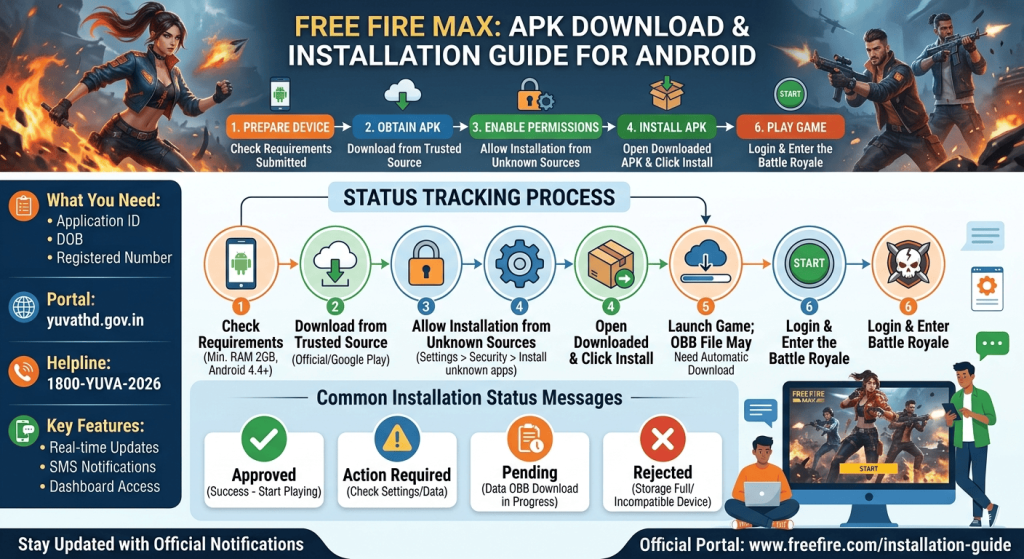
Follow these steps to install the game on your Android smartphone.
Step 1: Open Google Play Store
Open the Google Play Store on your phone and search for Free Fire MAX. Confirm that the listing is published by the official developer before proceeding.
Step 2: Tap Install
Open the correct listing and tap the Install button. Wait for the download and installation process to finish. Download time will depend on your internet speed and the size of the available update.
Step 3: Open the Game
Once installation is complete, tap Open. The game may download additional resources when you launch it for the first time, so maintain a stable internet connection.
Step 4: Complete the Initial Setup
Follow the on-screen instructions. Depending on the current version, you may need to accept the terms, select available settings, or sign in using a supported account method.
Keep your account credentials private and use official login options only.
Step 5: Adjust Graphics and Controls
After entering the game, explore the graphics and sensitivity settings. If you experience lag, reduce the graphics quality and close unnecessary background apps. You can gradually adjust the controls to find a comfortable setup.
How to Install an APK File Manually
Some Android users prefer APK installation, but downloading an APK from an unofficial source carries additional security risks. Use manual installation only when you can verify the source and the file’s authenticity.
If Garena provides a legitimate APK through an official distribution channel, follow its specific instructions. The general Android process is as follows:
- Download the APK from the verified source.
- Open your phone’s Downloads folder or the location where the file was saved.
- Tap the file to begin installation.
- If Android asks for permission to install unknown apps, review the source carefully before allowing it.
- Follow the installation prompts and open the game when installation finishes.
- Disable the source’s installation permission afterward if you no longer need it.
Android requires users to opt in before installing apps from sources outside trusted app stores. The exact settings depend on your Android version. Learn more from Android Developers.
Security warning: Do not install an APK if its source is unclear, the file has been modified, or your device displays a serious security warning. Google Play Protect can check apps and warn about potentially harmful software. Keep it enabled and follow its warnings. Google Play Protect safety information.
Free Fire MAX Features and Gameplay
Free Fire MAX is designed for players who want a visually enhanced battle royale experience. Its main attractions include:
Enhanced Visual Experience
The game features detailed environments, visual effects, and character animations. The actual quality you experience depends on your phone’s hardware and graphics settings.
Battle Royale Matches
Players collect equipment, move through the map, and compete against opponents while trying to remain the last survivor. Strategy, positioning, and teamwork can be just as important as aim.
Clash Squad and Competitive Play
Free Fire includes team-based modes such as Clash Squad, where players compete in shorter rounds. Mode availability and details may change with updates.
Character and Control Customization
Players can explore character abilities and adjust sensitivity and control layouts to suit their playing style. Take time to practice before entering ranked matches.
Regular Game Updates
Garena releases updates that may include bug fixes, balance changes, events, and new content. Check the official Garena news page for announcements rather than relying on unofficial update claims.
Common Free Fire MAX Installation Problems
If the game does not install or run properly, try the following solutions.
App Not Installed
Check whether your phone has sufficient storage and whether the downloaded file is compatible with your device. If you used an APK, delete any questionable or incomplete file and obtain the game through an official source.
Download Stuck or Failed
Switch to a stable internet connection, check available storage, and retry the download. You can also check the Google Play Store for pending downloads or service issues.
Game Crashes or Lags
Restart your phone, close unnecessary apps, and lower the graphics settings. Install available updates from the official store. Older or less powerful devices may not provide the same performance as newer phones.
APK Parsing Error
A parsing error can occur if a file is incomplete, incompatible, or incorrectly packaged. Do not repeatedly install files from different unknown websites. Delete the problematic file and use the official distribution method.
Login or Connection Issues
Check your internet connection and verify that the game’s servers are available. If the issue continues, consult Garena’s official support resources.
Is Free Fire MAX APK Safe to Download?
Safety depends on where the file comes from and whether it has been altered. An APK hosted on an unknown website may contain malicious code, request unnecessary permissions, or expose your information.
For better protection:
- Prefer Google Play or a verified official distribution source.
- Keep Android and Google Play Protect updated.
- Avoid modified APKs, cheats, and unofficial diamond generators.
- Never share passwords or verification codes.
- Review app permissions and avoid granting unrelated access.
- Do not pay unofficial websites for downloads or guaranteed in-game rewards.
These precautions cannot guarantee that every file is safe, but they reduce the risks associated with untrusted downloads.
Frequently Asked Questions
1. How do I download Free Fire MAX on Android?
Open the official Google Play listing, confirm that it is the correct game, and tap Install if it is available for your device and region.
2. Can I install Free Fire MAX using an APK?
Android supports APK installation, but you should only use a file from a verified and legitimate source. The official store is the preferred option for most users.
3. Why is Free Fire MAX not installing on my phone?
Possible causes include insufficient storage, device incompatibility, a damaged installation file, or a network problem. Check the official listing and retry using a stable connection.
4. Is Free Fire MAX free to play?
The game is listed as free to play, with optional in-app purchases. Review the store listing for the latest details and manage purchases carefully.
5. Where can I find official Free Fire MAX updates?
Check the official Google Play listing and Garena’s official news page for supported releases and announcements.
Conclusion
Free Fire MAX APK Download can help Android users find the game and learn how to install it correctly. For the best balance of convenience and security, start with the official Google Play listing and confirm your phone’s compatibility before downloading.
If manual APK installation is necessary, verify the source, review Android’s security warnings, and avoid modified files that promise unauthorized benefits. Once the game is installed, adjust your graphics and controls to match your device, keep the game updated, and enjoy a smoother battle royale experience.