Before downloading a mobile game, it is important to check how much storage your device needs. Free Fire APK File Size 2026 is a useful topic for Android users who want to install the game without running into storage problems, failed downloads, or installation errors. The actual file size can vary depending on the game version, device, and distribution method.
In addition to the downloaded APK, your phone may need extra storage for installation files, game resources, updates, and temporary data. Understanding these requirements can help you prepare your device before installing Free Fire.
Free Fire APK File Size 2026: How Much Space Do You Need?
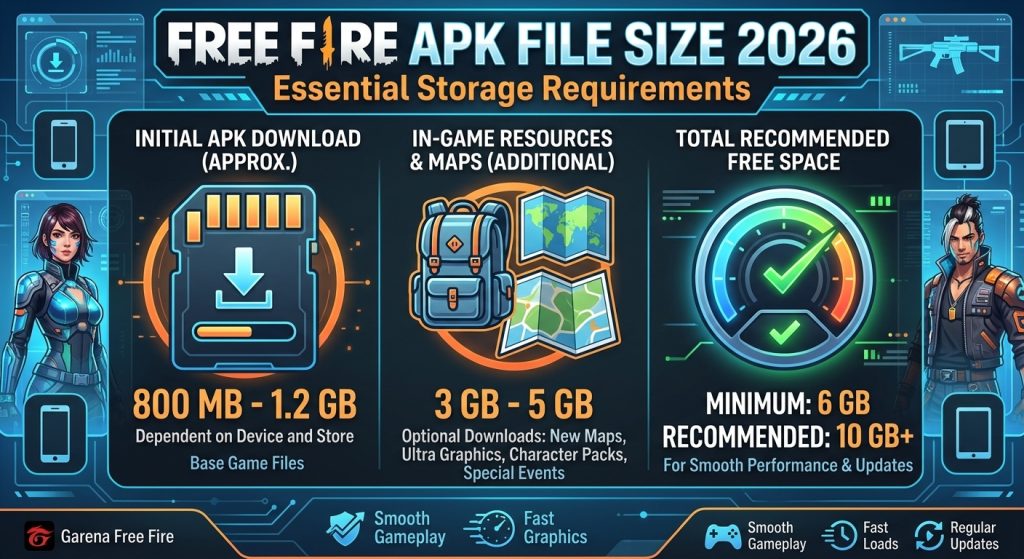
The exact Free Fire APK file size in 2026 may differ between versions and download sources. The APK is only the installation package; it does not necessarily include every resource the game needs after installation.
Once installed, the game may download additional resources, including maps, character data, visual effects, and other in-game content. Updates can also increase the amount of storage required.
For this reason, check the file size displayed by the official app store or trusted download source before starting your download. Avoid relying on a single fixed size listed on an unrelated website.
What Is the Difference Between APK Size and Installed Size?
APK size and installed size are not always the same. Knowing the difference helps you estimate how much free space your phone needs.
APK Download Size
The APK download size is the size of the installation file you download to your device. This is the amount of data your internet connection must transfer, although additional downloads may follow.
Installed Game Size
The installed size is the space occupied by the application after installation. Android may unpack or optimize files during the process, which can make the installed size different from the original APK size.
Additional Game Resources
Some game resources may be downloaded separately after you open the application. These files can include optional content, updated assets, and other resources needed for gameplay.
Your total storage requirement may therefore be higher than the APK size shown before downloading.
How Much Free Storage Should Your Android Phone Have?
There is no single storage requirement that applies to every Free Fire version and Android device. The safest approach is to check the game’s current requirements and leave additional free space for installation and updates.
Before downloading, consider these factors:
- The APK file size
- The installed application size
- Additional in-game downloads
- Temporary installation files
- Future updates
- Other applications and personal files
If your phone is almost full, remove unnecessary downloads, unused applications, duplicate photos, and large files before installing the game.
How to Check Free Fire APK File Size 2026
You can check the download size before installing the game by following these simple steps.
Step 1: Open a Trusted Download Source
Whenever possible, use the official Google Play Store listing for Free Fire in your region. Check the displayed application information and available download details.
Step 2: Review the Download Information
Look for the current version and any size information provided by the store or trusted source. Remember that the size can change when a new version is released.
Step 3: Check Your Phone’s Storage
Open your Android settings and select Storage. The exact menu name may vary by phone manufacturer.
Check how much space is available before downloading the game.
Step 4: Allow Extra Space
Do not use every remaining megabyte for the download. Leave enough room for installation, temporary files, and additional resources that may be required when the game starts.
Step 5: Install and Check for Updates
After installation, open the game and allow any necessary resources to download over a stable connection. Make sure you have sufficient storage before applying updates.
Why Does Free Fire Need Additional Storage?
Modern mobile games contain more than the files required to launch the application. They may include detailed environments, character models, animations, audio, interface elements, and other assets.
Additional storage may be required for several reasons:
- Game updates: New versions may replace or add application files.
- Downloaded resources: Some content is downloaded after installation.
- Temporary files: Android may need working space during installation and updates.
- Cached data: Frequently used resources may be stored locally.
- Device-specific files: Some installation packages or resources may differ between devices.
The exact amount of additional storage depends on the game version and how much content is installed.
What If Free Fire Does Not Install Because of Low Storage?
If Free Fire fails to install, low storage may be the cause. You can try these practical solutions.
Remove Unnecessary Files
Delete files you no longer need, such as old videos, duplicate images, and unused downloads. Back up important files before removing them.
Uninstall Unused Applications
Review your installed applications and remove those you no longer use. Avoid uninstalling applications that are important for your phone’s operation.
Restart Your Device
After freeing up space, restart your phone and try the installation again.
Download a Fresh Installation File
If the APK is incomplete or damaged, it may fail even when sufficient storage is available. Delete the problematic file and download a fresh copy from a trusted source.
For more troubleshooting advice, read our Free Fire APK Not Installing 2026 guide.
Does Free Fire File Size Change After Updates?
Yes, the size can change as the game receives updates. Developers may add content, optimize existing files, fix bugs, or remove outdated resources.
An updated version may be larger or smaller than an earlier version. The final storage usage can also depend on downloaded game resources and cached files.
Before installing an update, check the available storage and make sure your internet connection is reliable. Avoid interrupting downloads, as incomplete files may cause installation problems.
How to Download Free Fire Safely
Storage is important, but the safety of the installation file matters too.
Follow these precautions:
- Prefer official distribution channels whenever available.
- Check the application name and publisher.
- Avoid modified APKs that promise unauthorized features.
- Do not ignore serious security warnings.
- Keep Android security features enabled.
- Use a stable internet connection.
- Avoid sharing passwords, verification codes, or account details with download websites.
You can also review Google Play Protect information to understand how Android helps identify potentially harmful applications.
Free Fire APK File Size 2026: Quick Checklist
Before installing Free Fire, use this checklist:
- Check the current download size.
- Confirm that your Android device is compatible.
- Review available internal storage.
- Leave extra room for installation and updates.
- Use a trusted download source.
- Avoid incomplete or suspicious APK files.
- Keep your payment and account information private.
- Check for additional resource downloads after installation.
These steps can help prevent common storage-related issues and make the installation process smoother.
Final Thoughts
Free Fire APK File Size 2026 depends on the version, installation method, and additional resources downloaded to your device. The APK download size alone does not represent the total storage needed to install and play the game.
Before downloading, check the latest size information from a trusted source, confirm your device compatibility, and make sure enough storage is available for installation and updates. If installation fails, free up space and check whether the APK file is complete.
Preparing your Android device in advance can help you avoid unnecessary errors and enjoy a smoother installation experience.