Trying to install Free Fire on Android but getting an error can be frustrating. If your Free Fire APK Not Installing 2026 issue is stopping you from playing, the problem may be related to storage, device compatibility, Android security settings, a damaged APK file, or an incomplete download.
Fortunately, many installation errors can be fixed with a few simple checks. This guide explains the most common reasons an APK may fail to install and provides practical solutions to help you troubleshoot the problem safely.
Why Is Free Fire APK Not Installing 2026?
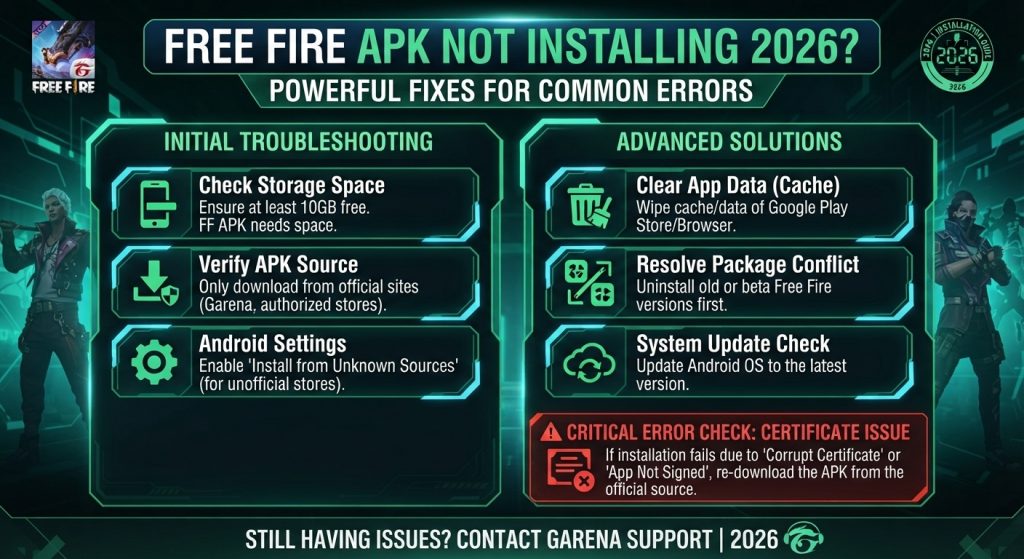
There can be several reasons why Free Fire APK installation fails. Identifying the exact cause makes troubleshooting much easier.
Common causes include:
- Insufficient storage space
- Corrupted or incomplete APK file
- Unsupported Android version
- Installation blocked by security settings
- Conflicting older installation
- Incorrect APK variant
- Damaged download
- Temporary Android system error
- Compatibility limitations on the device
Before trying advanced solutions, restart your phone and try the installation again. A simple restart can sometimes resolve temporary system problems.
Check Your Android Storage
One of the most common causes of APK installation failure is insufficient storage.
Even when an APK file appears relatively small, Android may require additional temporary space during installation. If your phone is almost full, the installation may fail.
Go to your phone’s Settings > Storage and check available space.
You can free up storage by removing:
- Unused applications
- Large videos
- Duplicate photos
- Old downloads
- Unnecessary documents
- Temporary files
After creating enough free space, restart the device and try installing the APK again.
Make Sure the APK File Is Complete
A damaged or incomplete APK can cause installation errors.
If the download was interrupted because of an unstable internet connection, the file may not have downloaded correctly. In this situation, repeatedly trying to install the same file usually will not help.
Delete the problematic file and download a fresh copy from a trustworthy source. Avoid modified or suspicious files because they may create additional security and compatibility problems.
Check Android Compatibility
Your Android version and device hardware can affect whether an application can be installed successfully.
Older devices may not support newer application builds, while some APK versions may require specific Android features.
Check your phone under Settings > About Phone to find your Android version. Then compare the application’s requirements with your device specifications.
If your device does not meet the requirements, installing another APK repeatedly is unlikely to solve the underlying compatibility problem.
Allow Installation From the Relevant Source
Android can restrict applications installed outside the Google Play Store. Depending on your Android version and device manufacturer, you may need to allow the browser or file manager that downloaded the APK to install applications.
Look for an option similar to:
Settings → Security/Privacy → Install Unknown Apps
Then select the application you are using to open the APK and review its permission.
Only enable this permission for a source you trust. After installation, you can disable the permission again.
Remove an Incompatible Older Version
An existing version of Free Fire can sometimes conflict with another APK package.
If you already have an installation that is causing a package conflict, check your installed applications and remove the older version if appropriate.
Before uninstalling an existing game, make sure your account progress is properly connected to an available supported login method so that you do not accidentally lose access to your game data.
Then restart your device and attempt the installation again.
Free Fire APK Not Installing 2026 Because of a Corrupt Download
A corrupted download is another common reason for the Free Fire APK Not Installing 2026 problem.
This can happen when:
- The internet connection drops during download.
- The browser stops downloading unexpectedly.
- The storage becomes full.
- The file is incomplete.
- The download source provides a damaged file.
The safest solution is to remove the damaged file and obtain a fresh installation file from an official or trusted source.
Do not install files that trigger serious security warnings or request unnecessary permissions.
Clear Temporary Android Data
If your device has enough storage and the APK appears valid, temporary system data could be contributing to the problem.
You can try clearing temporary data for the browser or file manager you used to download the file. The exact steps vary by Android manufacturer.
After clearing temporary data:
- Restart your phone.
- Download the APK again if necessary.
- Check the file size.
- Open the file using a compatible file manager.
- Try the installation again.
Avoid clearing application data for your game unless you understand what information will be removed.
Check Google Play Protect Warnings
Android devices may scan applications for security risks. If an APK is flagged, do not simply ignore the warning.
Google explains that Play Protect helps check applications for potentially harmful behavior. If your installation is being blocked because of a security warning, investigate the source of the file instead of attempting to bypass the warning.
For more information, you can review the official Google Play Protect information.
Download the Correct Version
Another possible reason for installation failure is using an APK that does not match your device or the intended application.
Avoid downloading random APK files from unknown websites. Some files may be modified, outdated, incompatible, or bundled with unwanted software.
For the safest approach, use an official distribution channel whenever the game is available there.
If you are researching APK installation requirements, our Free Fire APK Installation Guide can also be used as a related resource.
Restart Your Android Device
It sounds simple, but restarting your device can resolve temporary background processes that interfere with installation.
A restart can help by:
- Closing stuck background processes
- Refreshing system resources
- Clearing temporary glitches
- Releasing some memory
- Reloading Android services
After restarting, try the installation again before making more complicated changes.
What If the APK Still Does Not Install?
If the problem continues after trying the basic solutions, check the exact error message shown by Android.
Different messages can point toward different problems. For example, a package conflict may indicate an existing installation, while a parsing-related error can indicate an incompatible or damaged APK.
Before trying another file, confirm:
- Your Android version
- Available storage
- APK source
- APK integrity
- Device compatibility
- Existing Free Fire installation
- Security warnings
If the device is too old or incompatible with the application version, the best solution may be using a supported version or upgrading the device rather than forcing an installation.
How to Avoid Future APK Installation Errors
You can reduce installation problems by following a few simple practices.
Always keep reasonable free storage on your phone and maintain a stable internet connection when downloading large files. Keep Android updated when your device supports the available updates.
Most importantly, use reliable sources and avoid files that appear suspicious or promise unrealistic features.
Do not disable important Android security protections just to install an APK. Security warnings can indicate genuine risks.
Free Fire APK Not Installing 2026 – Quick Fix Checklist
Free Fire APK Installation GuideIf you need a quick troubleshooting checklist, try these steps:
- Restart your Android device.
- Check available storage.
- Confirm your Android version.
- Delete the potentially damaged APK.
- Download a fresh file from a trusted source.
- Check whether an older version is already installed.
- Review installation permissions.
- Check Google Play Protect warnings.
- Confirm device compatibility.
- Try the official distribution method whenever available.
These steps cover most common installation-related problems without requiring complicated technical changes.
Final Thoughts
The Free Fire APK Not Installing 2026 problem can happen for many reasons, but most issues are related to storage, compatibility, corrupted downloads, security restrictions, or conflicting installations.
Start with the simplest solutions: restart your device, free up storage, verify Android compatibility, and make sure the installation file comes from a trustworthy source. If Android displays a security warning, take it seriously instead of bypassing the protection.
For the safest experience, prefer official distribution channels whenever possible and keep your Android device and security features up to date.